
Clinical Tool - Modulith
Section titled “Clinical Tool - Modulith”Modular Monolith for a “Clinical Tool” using JPA and Domain Events.
SpringBoot + Java modular monolith for a “Clinical Tool” using JPA for persistence for this Domain Model:

The project is composed by five vertical modules: clinical, users, documents, masterdata and surveys.
They are vertical modules in the sense that they do not call each other or database tables from other modules.
Each module exposes a REST API as part of its internal implementation, except clinical which exposes its functionality through two different API modules: web-api and mobile-api.
surveys module also exposes two different APIs: surveys-backoffice and surveys-public but its implementation is an internal implementation detail.
We’ll see in the following sections detailed instructions on how to configure ZenWave SDK to generate a modular monolith like this one.
You can find the Complete Source Code at github.
ZenWave Domain Models
Section titled “ZenWave Domain Models”This project was generated using the following ZenWave scripts, as always you can run each of these plugins using the ZenWave Model Editor for IntelliJ or from the command line using JBang:
ZenWave Scripts for Clinical Tool - Modulith
config {    title "Clinical Tool Backend"    basePackage "io.zenwave360.example.clinicaltool"    persistence jpa    databaseType postgresql
    layout.commonPackage "{{basePackage}}.common"    layout.infrastructureRepositoryCommonPackage "{{commonPackage}}"    layout.adaptersWebMappersCommonPackage "{{commonPackage}}.mappers"    layout.coreImplementationMappersCommonPackage "{{commonPackage}}.mappers"
    // these should match the values of openapi-generator-maven-plugin    openApiModelNameSuffix DTO    // used by ZDLToOpenAPIPlugin    idType integer    idTypeFormat int64
    // BackendApplicationDefaultPlugin    useLombok true    useSpringModulith true
    haltOnFailFormatting false

    plugins {
        ZDLToOpenAPIPlugin {            title "Clinical Tool - WebApp API"            zdlFiles "models/clinical.zdl"            targetFile "src/main/resources/public/apis/webapp-openapi.yml"            operationIdsToExclude "getPatientProfileById"        }
        ZDLToOpenAPIPlugin {            title "Clinical Tool - Mobile API"            zdlFiles "models/clinical.zdl"            targetFile "src/main/resources/public/apis/mobile-openapi.yml"            operationIdsToInclude "getPatientProfileById,requestOptOut"        }
        ZDLToOpenAPIPlugin {            title "Surveys - Backoffice API"            zdlFile "models/surveys.zdl"            targetFile "src/main/resources/public/apis/surveys-backoffice-openapi.yml"            operationIdsToExclude "getSurveyAndQuestionsForPatient,answerSurvey,updateSurveyAnswers,getSurveyAnswers"        }
        ZDLToOpenAPIPlugin {            title "Surveys - Public API"            zdlFile "models/surveys.zdl"            targetFile "src/main/resources/public/apis/surveys-public-openapi.yml"            operationIdsToInclude "getSurveyAndQuestionsForPatient,answerSurvey,updateSurveyAnswers,getSurveyAnswers"        }
        ZDLToOpenAPIPlugin {            title "Documents API"            zdlFile "models/documents.zdl"//            openapiOverlayFiles "src/main/resources/public/apis/documents-openapi-overlay.yml"            targetFile "src/main/resources/public/apis/documents-openapi.yml"        }
        ZDLToOpenAPIPlugin {            title "Master Data API"            zdlFiles "models/masterdata.zdl"            targetFile "src/main/resources/public/apis/masterdata-openapi.yml"        }
        ZDLToOpenAPIPlugin {            title "Terms And Conditions API"            zdlFiles "models/terms-and-conditions.zdl"            targetFile "src/main/resources/public/apis/terms-and-conditions-openapi.yml"        }
        ZDLToOpenAPIPlugin {            title "User Managament API"            zdlFiles "models/users.zdl"            openapiOverlayFiles "src/main/resources/public/apis/user-additionalproperties-overlay.yml"            targetFile "src/main/resources/public/apis/users-openapi.yml"        }

        //-----------------------------
        BackendApplicationDefaultPlugin {            zdlFile "models/clinical.zdl"            // --force // overwite all files        }
        BackendApplicationDefaultPlugin {            zdlFile "models/surveys.zdl"            // --force // overwite all files        }
        BackendApplicationDefaultPlugin {            zdlFile "models/documents.zdl"             // --force // overwite all files        }
        BackendApplicationDefaultPlugin {            zdlFile "models/masterdata.zdl"            // --force // overwite all files        }
        BackendApplicationDefaultPlugin {            zdlFile "models/terms-and-conditions.zdl"            // --force // overwite all files        }
        BackendApplicationDefaultPlugin {            zdlFile "models/users.zdl"            // --force // overwite all files        }

        //-----------------------------
        OpenAPIControllersPlugin {            zdlFiles "models/clinical.zdl"            openapiFile "src/main/resources/public/apis/webapp-openapi.yml"
            layout.customWebModule "{{basePackage}}.modules.web.webapp"            layout.adaptersWebPackage "{{layout.customWebModule}}"            layout.openApiApiPackage "{{layout.customWebModule}}"            layout.openApiModelPackage "{{layout.customWebModule}}.dtos"        }
        OpenAPIControllersPlugin {            zdlFiles "models/clinical.zdl"            openapiFile "src/main/resources/public/apis/mobile-openapi.yml"
            layout.customWebModule "{{basePackage}}.modules.web.mobile"            layout.adaptersWebPackage "{{layout.customWebModule}}"            layout.openApiApiPackage "{{layout.customWebModule}}"            layout.openApiModelPackage "{{layout.customWebModule}}.dtos"        }
        OpenAPIControllersPlugin {            zdlFiles "models/surveys.zdl"            openapiFile "src/main/resources/public/apis/surveys-backoffice-openapi.yml"        }
        OpenAPIControllersPlugin {            zdlFiles "models/surveys.zdl"            openapiFile "src/main/resources/public/apis/surveys-public-openapi.yml"        }
        OpenAPIControllersPlugin {            zdlFiles "models/documents.zdl"            openapiFile "src/main/resources/public/apis/documents-openapi.yml"        }
        OpenAPIControllersPlugin {            zdlFiles "models/masterdata.zdl"            openapiFile "src/main/resources/public/apis/masterdata-openapi.yml"        }
        OpenAPIControllersPlugin {            zdlFiles "models/terms-and-conditions.zdl"            openapiFile "src/main/resources/public/apis/terms-and-conditions-openapi.yml"        }
        OpenAPIControllersPlugin {            zdlFiles "models/users.zdl"            openapiFile "src/main/resources/public/apis/users-openapi.yml"        }
        //-----------------------------
        SpringWebTestClientPlugin {            zdlFiles "models/surveys.zdl"            openapiFile "src/main/resources/public/apis/surveys-backoffice-openapi.yml"        }
        SpringWebTestClientPlugin {            zdlFiles "models/surveys.zdl"            openapiFile "src/main/resources/public/apis/surveys-public-openapi.yml"        }
        SpringWebTestClientPlugin {            zdlFiles "models/documents.zdl"            openapiFile "src/main/resources/public/apis/documents-openapi.yml"        }
        SpringWebTestClientPlugin {            zdlFiles "models/masterdata.zdl"            openapiFile "src/main/resources/public/apis/masterdata-openapi.yml"        }
        SpringWebTestClientPlugin {            zdlFiles "models/terms-and-conditions.zdl"            openapiFile "src/main/resources/public/apis/terms-and-conditions-openapi.yml"        }
        //-----------------------------
        OpenAPIKaratePlugin {            basePackage "{{basePackage}}.adapters.web"            testsPackage "karate.webapp"            apiFile "src/main/resources/public/apis/webapp-openapi.yml"        }        OpenAPIKaratePlugin {            basePackage "{{basePackage}}.adapters.web"            testsPackage "karate.mobile"            apiFile "src/main/resources/public/apis/mobile-openapi.yml"        }        OpenAPIKaratePlugin {            basePackage "{{basePackage}}.adapters.web"            testsPackage "karate.surveys.backoffice"            apiFile "src/main/resources/public/apis/surveys-backoffice-openapi.yml"        }        OpenAPIKaratePlugin {            basePackage "{{basePackage}}.adapters.web"            testsPackage "karate.surveys.api"            apiFile "src/main/resources/public/apis/surveys-public-openapi.yml"        }
}}And ZenWave Domain Models located on folder: https://github.com/ZenWave360/zenwave-playground/tree/main/examples/modulith-clinical-tool-jpa/models
Clinical Tool Domain Model.zdl
config {    title "Clinical Tool Backend"    layout.moduleBasePackage "io.zenwave360.example.clinicaltool.modules.clinical"    // you can choose different layouts, see docs at https://www.zenwave360.io/docs/    layout CleanHexagonalProjectLayout}
@aggregateentity Hospital {    name String required unique maxlength(254)    lang String required maxlength(3) /** Primary language of the hospital */    timezone String required maxlength(3) /** ECT (Europe/Madrid)  */}
@aggregate@auditingentity Doctor {    userId Long    profilePictureId Long    hospitalId Long required    name String required maxlength(100)    surname String required maxlength(100)    surname2 String maxlength(100)    email String maxlength(100) pattern(/^[a-zA-Z0-9._%+-]+@[a-zA-Z0-9.-]+\.[a-zA-Z]{2,4}$/)    phoneNumber String maxlength(20)    lang String maxlength(3) /** Primary language of the doctor */}
@aggregate@auditingentity Patient {    userId Long    hospitalId Long required    profilePictureId Long
    @naturalId    phoneNumber String required maxlength(20)    @naturalId    hisNumber String required maxlength(100)
    email String required maxlength(100) pattern(/^[a-zA-Z0-9._%+-]+@[a-zA-Z0-9.-]+\.[a-zA-Z]{2,4}$/)
    generalInfo GeneralInfo {        name String required maxlength(100)        surname String required maxlength(100)        surname2 String maxlength(100)        identityDocumentType IdentityDocumentType required        identityDocumentNumber String required maxlength(20)        birthDate LocalDate required        gender GenderType required        lang String maxlength(3) /** Primary language of the patient */    }
    healthInsuranceInfo HealthInsuranceInfo {        insuranceCompanyId String required maxlength(100)        insuranceCardNumber String required maxlength(20)    }
    @json documentIds Long[]}
relationship OneToMany {    Patient{medicalContacts required } to MedicalContact{patient required}    Patient{personalContacts required } to PersonalContact{patient required}    Patient{patientAddresses required } to PatientAddress{patient required}    Patient{hospitalAddresses required } to HospitalAddress{patient required}    Patient{patientWearables required } to PatientWearable{patient required}}
@skipentity Address {   street String required maxlength(100)   city String required maxlength(100)   postalCode String required maxlength(10)   countryCode String required maxlength(3)   additionalInfo String maxlength(254)}
@copy(Address)entity PatientAddress {   current Boolean required}
@copy(Address)entity HospitalAddress {}
enum IdentityDocumentType {    DNI(1), NIE(2), PASSPORT(3)}
enum GenderType {    MALE(1), FEMALE(2), OTHER(3)}

entity PatientWearable {    wearableType String required    serialNumber String maxlength(20)}

entity MedicalContact {    name String required maxlength(100)    surname String required maxlength(100)    surname2 String maxlength(100)    hospital String maxlength(254)    area String maxlength(100)    jobPosition String maxlength(100)    phoneNumber String required maxlength(20)    email String required maxlength(100) pattern(/^[a-zA-Z0-9._%+-]+@[a-zA-Z0-9.-]+\.[a-zA-Z]{2,4}$/)}
entity PersonalContact {    name String required maxlength(100)    surname String required maxlength(100)    surname2 String maxlength(100)    phoneNumber String required maxlength(20)    email String required maxlength(100) pattern(/^[a-zA-Z0-9._%+-]+@[a-zA-Z0-9.-]+\.[a-zA-Z]{2,4}$/)    patientRelationshipType PatientRelationshipType    emergencyContact Boolean required}
enum PatientRelationshipType {    SON_DAUGTHER(1), CARE_GIVER(2), OTHER(3)}
@inlineinput HospitalId {    hospitalId Long required}
@inlineinput CriterioPatient {    hisNumber String required maxlength(100)    phoneNumber String required maxlength(20)}
output PatientHospital {    patientId Long    hospitalId Long    hisNumber String    fullName String    gender GenderType    dni String    birthDate LocalDate    phone String    email String    insuranceCardNumber String    address String}
@restservice HospitalService for (Hospital, Doctor) {    @get("/hospitals/{id}")    getHospital(id) Hospital?    @post("/hospitals")    createHospital(Hospital) Hospital    @put("/hospitals/{id}")    updateHospital(id, Hospital) Hospital?    @get("/hospitals")    listHospitals() Hospital[]
    @post("/doctors")    createDoctor(Doctor) Doctor withEvents DoctorCreated    @put("/doctors/{id}")    updateDoctor(id, Doctor) Doctor?    @get("/doctors/{id}")    getDoctor(id) Doctor?    @get("/doctors")    listDoctors() Doctor[]
    @get("/hospital/{hospitalId}/doctors")    @entityForId(Hospital)    listHospitalDoctors(HospitalId) Doctor[]
    @get("/hospital/{hospitalId}/patients")    @entityForId(Hospital)    listHospitalPatients(HospitalId) PatientHospital[]}
input DocumentSignatureRequestedInput {    documentInfoId Long required    patientId Long required}
@restservice PatientsService for (Patient) {
    @get("/patients/{hisNumber}/{phoneNumber}")    loadPatient(@natural id) Patient
    @post("/patients")    createPatient(Patient) Patient withEvents PatientCreated
    @patch("/patients/{hisNumber}/{phoneNumber}")    partialPatientUpdate(@natural id, Patient) Patient
    @put("/patients/{id}")    updatePatient(id, Patient) Patient?
    @get("/patients/{id}")    getPatient(id) Patient?
    @get("/patients/{id}/profile")    @policies(isMobile)    @entityForId(Patient)    getPatientProfileById(id) PatientProfile
    @listener({model: "models/documents.zdl", event: DocumentSignatureRequested})    associateDocumentWithPatient(DocumentSignatureRequestedInput)}
output PatientProfile {    name String required maxlength(100)    surname String required maxlength(100)    surname2 String maxlength(100)    birthDate LocalDate required    gender GenderType required    phoneNumber String required maxlength(20)}
event DoctorCreated {    doctor Doctor}
event PatientCreated { patient Patient}Users Domain Model.zdl
config {    title "User Management"    layout.moduleBasePackage "io.zenwave360.example.clinicaltool.modules.users"    // you can choose: DefaultProjectLayout, CleanHexagonalProjectLayout, LayeredProjectLayout, SimpleDomainProjectLayout, HexagonalProjectLayout, CleanArchitectureProjectLayout    layout SimpleDomainProjectLayout}
@aggregate@auditingentity User (application_user) {    name String    @naturalId    username String required unique    email String required unique    password String
    @set    roles String[] required
    enabled Boolean    credentialsNonExpired Boolean    accountNonExpired Boolean    accountNonLocked Boolean
    @jsonb additionalProperties Map}
input SearchCriteria {    username String    email String    role String    enabled Boolean    searchTerms Map}
@rest("/users")service UserService for (User) {
    @get("/{username}")    findByUsername(@natural id) User?
    @post    createUser(User) User    @put("/{username}")    updateUser(@natural id, User) User?
    @put(path: "/{username}/enable", status: 200)    enableAccount(@natural id) User?    @put(path: "/{username}/disable", status: 200)    disableAccount(@natural id) User?    @delete("/{username}")    deleteUser(@natural id)
@post(path: "/search", status: 200) @paginated searchUsers(SearchCriteria) User[] @get @paginated listUsers() User[]}Documents Domain Model.zdl
config {    title "Documents Model"    layout.moduleBasePackage "io.zenwave360.example.clinicaltool.modules.documents"    // you can choose: DefaultProjectLayout, CleanHexagonalProjectLayout, LayeredProjectLayout, SimpleDomainProjectLayout, HexagonalProjectLayout, CleanArchitectureProjectLayout    layout SimpleDomainProjectLayout}
@aggregateentity DocumentInfo {    uuid String    fileName String required    documentType String required    contentType String required    tags String[]}
entity DocumentData {    data Blob required}
relationship OneToOne {    DocumentInfo{documentData required } to @Id DocumentData{document required}}
@inlineinput DocumentIds {    documentIds Long[]}
@rest("/documents")service DocumentService for (DocumentInfo) {
    @get({path: "/"})    listDocumentInfo(DocumentIds) DocumentInfo[]
    @get({path: "/{id}", params: {preview: boolean} })    @filedownload("documentData.data")    downloadDocument(id) DocumentInfo
    @post({path: "/upload", status: 201})    @fileupload("file")    uploadDocument(DocumentInfo) DocumentInfo
@delete({path: "/{id}", status: 204}) deleteDocumentInfo(id)}Master Data Domain Model.zdl
config {    title "Master Data"    layout.moduleBasePackage "io.zenwave360.example.clinicaltool.modules.masterdata"    // you can choose: DefaultProjectLayout, CleanHexagonalProjectLayout, LayeredProjectLayout, SimpleDomainProjectLayout, HexagonalProjectLayout, CleanArchitectureProjectLayout    layout SimpleDomainProjectLayout}
@aggregateentity MasterData {    @naturalId    type MasterDataType required    @naturalId    key String required maxlength(254)    value String required maxlength(254)    @jsonb translations MasterDataTranslation[] {        lang String required        text String required    }}
enum MasterDataType {    GENDER(1)    ID_DOCUMENT_TYPE(2)    COUNTRY(3)    INSURANCE_COMPANY(4)    MEDICAL_AREA(5)}
output MasterDataKeyValue {    key String    value String}
@inlineinput MasterDataFilter {    type MasterDataType    lang String}
@rest("/masterdata")service MasterDataService for (MasterData) {    @post    createMasterData(MasterData) MasterData    @get("/{id}")    getMasterData(id) MasterData?    @put("/{id}")    updateMasterData(id, MasterData) MasterData?    @get @paginated    listMasterData() MasterData[]    @delete("/{id}")    deleteMasterData(id)
@get("/type/{type}/{lang}") listMasterDataOfType(MasterDataFilter) MasterDataKeyValue[]}Surveys Domain Model.zdl
config {    title "Clinical Surveys Backend"    layout.moduleBasePackage "io.zenwave360.example.clinicaltool.modules.surveys"    layout LayeredProjectLayout}
apis {    openapi(provider) BackOfficeAPI {        url "src/main/resources/public/apis/surveys-backoffice-openapi.yml"    }    openapi(provider) PublicAPI {        url "src/main/resources/public/apis/surveys-public-openapi.yml"    }}
@aggregate@auditingentity Survey {    @naturalId    name String required maxlength(254) /** Unique identifier for the survey */    @naturalId    hospitalId Long required    title String required maxlength(254) /** Public title for the survey */    lang String required maxlength(3) /** Default language for this survey */    @jsonb sections SurveySection[] {        name String required maxlength(254) /** Unique identifier for the section */        translations SectionTranslation[] {            lang String required            title String required            summary String        }        questionIds Long[] /** Sorted List of Questions for this section */    }}
@aggregate@auditingentity Question {    name String required unique maxlength(254) /** Unique identifier for the question */    questionType QuestionType required    required boolean = true    rangeStart Integer    rangeEnd Integer    @jsonb translations QuestionTranslation[] {        lang String required        text String required    }    @jsonb options Option[] { // mas facil mantener el orden que con OneToMany        name String required maxlength(254)        translations OptionTranslation[] {            lang String required            text String required        }    }    includeOther Boolean = false}
enum QuestionType {    YES_NO(1), MULTIPLE_SELECTION(2), SINGLE_SELECTION(3), TEXT(4), NUMBER(5), DECIMAL(6), RANGE(7),}
@aggregate@auditingentity SurveyAnswers {    @naturalId    surveyId Long required    @naturalId    patientId Long required    @naturalId    date LocalDate required    lang String required    @jsonb answers Answer[] {        questionId Long required        value String        values String[]        otherValue String    }}

input SurveysByHospital {    hospitalId Long required    lang String maxlength(3)}
/*** Service for managing surveys and questions in the backoffice.*/@apis(BackOfficeAPI)@rest("/backoffice/surveys")service SurveysBackofficeService for (Survey, Question) {    @get    listSurveys() Survey[]    @get("/{id}")    getSurvey(id) Survey?    @post    createSurvey(Survey) Survey    @put("/{id}")    updateSurvey(id, Survey) Survey?    @delete("/{id}")    @entityForId(Survey)    deleteSurvey(id)
    @get("/questions")    listQuestions() Question[]    @get("/questions/{id}")    getQuestion(id) Question?    @post("/questions")    createQuestion(Question) Question    @put("/questions/{id}")    updateQuestion(id, Question) Question?    @entityForId(Question)    @delete("/questions/{id}")    deleteQuestion(id)}
/*** This object represent a full survey with all the questions and options translated to the patient language.*/output SurveyAndQuestions {    surveyId Long required /** Persistence identifier for the survey */    name String required maxlength(254) /** Unique identifier for the survey across all environments */    title String required maxlength(254) /** Public title for the survey */    hospitalId Long required    lang String required maxlength(3) /** Default language for this survey */    sections SurveySectionOutput[] {        name String required maxlength(254) /** Unique identifier for the section */        title String required maxlength(254) /** Public title for the section */        summary String        questions QuestionTranslationOutput[] {            questionId Long required            required boolean = true            rangeStart Integer            rangeEnd Integer            text String required maxlength(254) /** Translated text for the question */            questionType QuestionType required            options OptionTranslationOutput[] {                name String required maxlength(254) /** Internal name for the option */                text String required /** Translated text for the option */            }            includeOther boolean = false        }    }}
@inlineinput SurveyByNameAndPatient {    name String required maxlength(254)    patientId Long required    lang String maxlength(3)}
/*** Public service to get Surveys and Questions for a patient and to answer the survey.*/@apis(PublicAPI)@rest("/public/surveys")service SurveysService for (SurveyAnswers) {
    @get({ path: "/{name}/patient/{patientId}/questions", params: { lang: String } })    getSurveyAndQuestionsForPatient(SurveyByNameAndPatient) SurveyAndQuestions
    @post("/{surveyId}/patient/{patientId}/answers/{date}")    answerSurvey(@natural id, SurveyAnswers) SurveyAnswers
    @patch({ path: "/{surveyId}/patient/{patientId}/answers/{date}", params: { surveyId: Long } })    updateSurveyAnswers(@natural id, SurveyAnswers) SurveyAnswers?
    @get("/{surveyId}/patient/{patientId}/answers/{date}")    getSurveyAnswers(@natural id) SurveyAnswers?
}Terms and Conditions Domain Model.zdl
config {    title "Clinical Terms And Conditions Backend"    layout.moduleBasePackage "io.zenwave360.example.clinicaltool.modules.termsandconditions"    // you can choose: DefaultProjectLayout, CleanHexagonalProjectLayout, LayeredProjectLayout, SimpleDomainProjectLayout, HexagonalProjectLayout, CleanArchitectureProjectLayout    layout SimpleDomainProjectLayout
}

@aggregateentity AcceptedTermsAndConditions {    @naturalId    userId Long required    termsAndConditionsId Long required    acceptedDate Instant required}
@aggregateentity TermsAndConditions {    content TextBlob required    lang String required maxlength(3) /** language code */    contentVersion String unique required /** Arbitrary version string */    startDate LocalDate unique required /** Date when the terms and conditions are valid (inclusive) */}
@inlineinput Lang {    lang String required maxlength(3) /** language code */}
input AcceptedTermsAndConditionsInput {    userId Long required    termsAndConditionsId Long required}
@rest("/terms-and-conditions")service TermsAndConditionsService for (AcceptedTermsAndConditions, TermsAndConditions) {    @get    listTermsAndConditions() TermsAndConditions[]    @get("/{id}")    getTermsAndConditions(id) TermsAndConditions?    @post    createTermsAndConditions(TermsAndConditions) TermsAndConditions    @put("/{id}")    updateTermsAndConditions(id, TermsAndConditions) TermsAndConditions?
@get("/latest/{lang}") getCurrentTermsAndConditions(Lang) TermsAndConditions? @post({ path: "/accept", status: 200 }) acceptTermsAndConditions(AcceptedTermsAndConditionsInput)}Building a Modular Monolith with ZenWave SDK
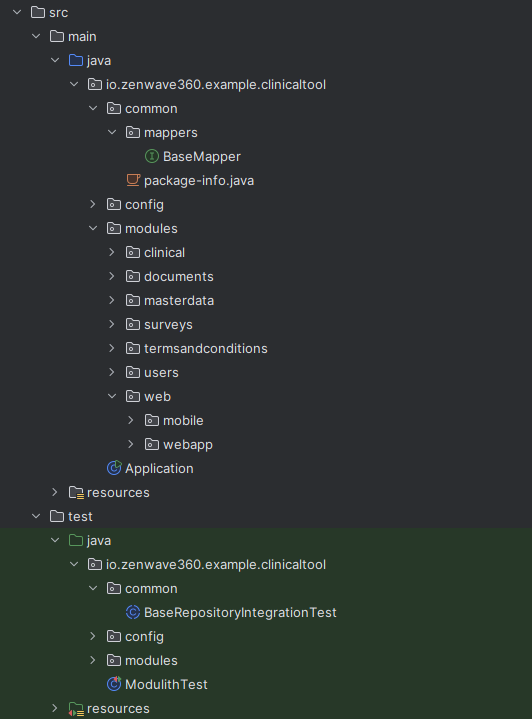
Section titled “Building a Modular Monolith with ZenWave SDK”When building modular monoliths is necessary to configure basePackage, moduleBasePackage and the different commonPackages in order to share base classes between different modules to avoid code duplication.
In zenwave-scripts.zw we configure the basePackage and the commonPackages:
ZenWave Scripts for Clinical Tool - Modulith
config {    title "Clinical Tool Backend"    basePackage "io.zenwave360.example.clinicaltool"    persistence jpa    databaseType postgresql
layout.commonPackage "{{basePackage}}.common" layout.infrastructureRepositoryCommonPackage "{{commonPackage}}" layout.adaptersWebMappersCommonPackage "{{commonPackage}}.mappers" layout.coreImplementationMappersCommonPackage "{{commonPackage}}.mappers"And each module has its own moduleBasePackage:
This results in the following source folder structure, with shared base classes in common packages:
Exposing a Module API as different Modules
Section titled “Exposing a Module API as different Modules”In this example we have a module clinical that exposes its functionality through two different API modules: web-api and mobile-api.
You can achieve that by generating two different OpenAPI definitions from the same ZenWave service.
Given this service definition:
Clinical Tool Domain Model.zdl
@restservice PatientsService for (Patient) {
    @get("/patients/{hisNumber}/{phoneNumber}")    loadPatient(@natural id) Patient
    @post("/patients")    createPatient(Patient) Patient withEvents PatientCreated
    @patch("/patients/{hisNumber}/{phoneNumber}")    partialPatientUpdate(@natural id, Patient) Patient
    @put("/patients/{id}")    updatePatient(id, Patient) Patient?
    @get("/patients/{id}")    getPatient(id) Patient?
    @get("/patients/{id}/profile")    @policies(isMobile)    @entityForId(Patient)    getPatientProfileById(id) PatientProfile
@listener({model: "models/documents.zdl", event: DocumentSignatureRequested}) associateDocumentWithPatient(DocumentSignatureRequestedInput)}You can configure code ZenWave Scripts to include or exclude certain operations from each API:
ZenWave Scripts for Clinical Tool - Modulith
        ZDLToOpenAPIPlugin {            title "Clinical Tool - WebApp API"            zdlFiles "models/clinical.zdl"            targetFile "src/main/resources/public/apis/webapp-openapi.yml"            operationIdsToExclude "getPatientProfileById"        }
ZDLToOpenAPIPlugin { title "Clinical Tool - Mobile API" zdlFiles "models/clinical.zdl" targetFile "src/main/resources/public/apis/mobile-openapi.yml" operationIdsToInclude "getPatientProfileById,requestOptOut" }And then with the functionality split in two different OpenAPI definitions, you can generate their corresponding controllers and tests on different modules:
ZenWave Scripts for Clinical Tool - Modulith
        OpenAPIControllersPlugin {            zdlFiles "models/clinical.zdl"            openapiFile "src/main/resources/public/apis/webapp-openapi.yml"
layout.customWebModule "{{basePackage}}.modules.web.webapp" layout.adaptersWebPackage "{{layout.customWebModule}}" layout.openApiApiPackage "{{layout.customWebModule}}" layout.openApiModelPackage "{{layout.customWebModule}}.dtos" }ZenWave Scripts for Clinical Tool - Modulith
        OpenAPIControllersPlugin {            zdlFiles "models/clinical.zdl"            openapiFile "src/main/resources/public/apis/mobile-openapi.yml"
layout.customWebModule "{{basePackage}}.modules.web.mobile" layout.adaptersWebPackage "{{layout.customWebModule}}" layout.openApiApiPackage "{{layout.customWebModule}}" layout.openApiModelPackage "{{layout.customWebModule}}.dtos" }Splitting one Service into multiple APIs on the same module
Section titled “Splitting one Service into multiple APIs on the same module”On the other hand surveys module exposes two different APIs: surveys-backoffice and surveys-public but they are implemented inside the same module.
Again you can achieve that by generating two different OpenAPI definitions from the same ZenWave service.
ZenWave Scripts for Clinical Tool - Modulith
        ZDLToOpenAPIPlugin {            title "Surveys - Backoffice API"            zdlFile "models/surveys.zdl"            targetFile "src/main/resources/public/apis/surveys-backoffice-openapi.yml"            operationIdsToExclude "getSurveyAndQuestionsForPatient,answerSurvey,updateSurveyAnswers,getSurveyAnswers"        }
ZDLToOpenAPIPlugin { title "Surveys - Public API" zdlFile "models/surveys.zdl" targetFile "src/main/resources/public/apis/surveys-public-openapi.yml" operationIdsToInclude "getSurveyAndQuestionsForPatient,answerSurvey,updateSurveyAnswers,getSurveyAnswers" }But in this case, because we don’t do any special configuration when generating the controllers, they will be generated in the same module:
Other interesting features
Section titled “Other interesting features”File Uploads
Section titled “File Uploads”When decorating a service method with @fileupload like this:
then `ZDLToOpenAPIPlugin` will generate this OpenAPI definition:
OpenAPI Definition
/documents/upload: post: operationId: "uploadDocument" description: "uploadDocument" tags: - "Document" parameters: - name: "uuid" in: "query" required: false schema: type: "string" - name: "tags" in: "query" required: false style: "form" explode: true schema: type: "array" items: type: "string" requestBody: required: true content: multipart/form-data: schema: type: "object" required: - "file" properties: file: type: "string" format: "binary" responses: "201": description: "OK" content: application/json: schema: $ref: "#/components/schemas/DocumentInfo"File Downloads
Section titled “File Downloads”When decorating a service method with @filedownload like this:
then `ZDLToOpenAPIPlugin` will generate this OpenAPI definition:
OpenAPI Definition
/documents/{id}: get: operationId: "downloadDocument" description: "downloadDocument" tags: - "Document" parameters: - name: "id" in: "path" required: true schema: type: "integer" format: "int64" - name: "preview" in: "query" schema: type: "boolean" responses: "200": description: "OK" headers: Content-Disposition: description: "Controls file download behavior. Values: 'inline' (display\ \ in browser) or 'attachment; filename=example.pdf' (download file)" schema: type: "string" content: '*/*': schema: type: "string" format: "binary"And the OpenAPIControllersPlugin will generate the corresponding controller code to handle file uploads and downloads.
DocumentApiController.java
@Override public ResponseEntity<Resource> downloadDocument(Long id, Boolean preview) { log.debug("REST request to downloadDocument: {}, {}", id, preview); var documentInfo = documentService.downloadDocument(id); byte[] bytes = documentInfo.getDocumentData().getData(); ByteArrayResource resource = new ByteArrayResource(bytes); return ResponseEntity.status(200) .header("Content-Disposition", "inline") // or attachment; filename=example.pdf .contentType(MediaType.APPLICATION_OCTET_STREAM) // TODO: set content type .body(resource); }Domain Events between Modules
Section titled “Domain Events between Modules”Modules can comunicate with each other using Event-Driven patterns with Domain Events.
When a service method emits a domain event that is not annotated with @asyncapi, BackendApplicationPlugin will generate an EventProducer which uses Spring event bus to publish the event.
NOTE: currently ZenWave SDK is not able to generate listeners for domain events between modules, as with @asyncapi events, and you need to implement them manually.
With an EventPublisher that use Spring’s ApplicationEventPublisher under the hood (and also an InMemoryEventPublisher for testing purposes):
DefaultEventPublisher.java
@Component@lombok.RequiredArgsConstructorpublic class DefaultEventPublisher implements EventPublisher {
    private final ApplicationEventPublisher applicationEventPublisher;
    public void onDoctorCreated(DoctorCreated event) {        applicationEventPublisher.publishEvent(event);    }
    public void onPatientCreated(PatientCreated event) {        applicationEventPublisher.publishEvent(event);    }}