
ZenWave Editor - IntelliJ Plugin
Section titled “ZenWave Editor - IntelliJ Plugin”ZenWave Editor: Seamless ZDL Editing & SDK Plugin Integration inside IntelliJ Platform.
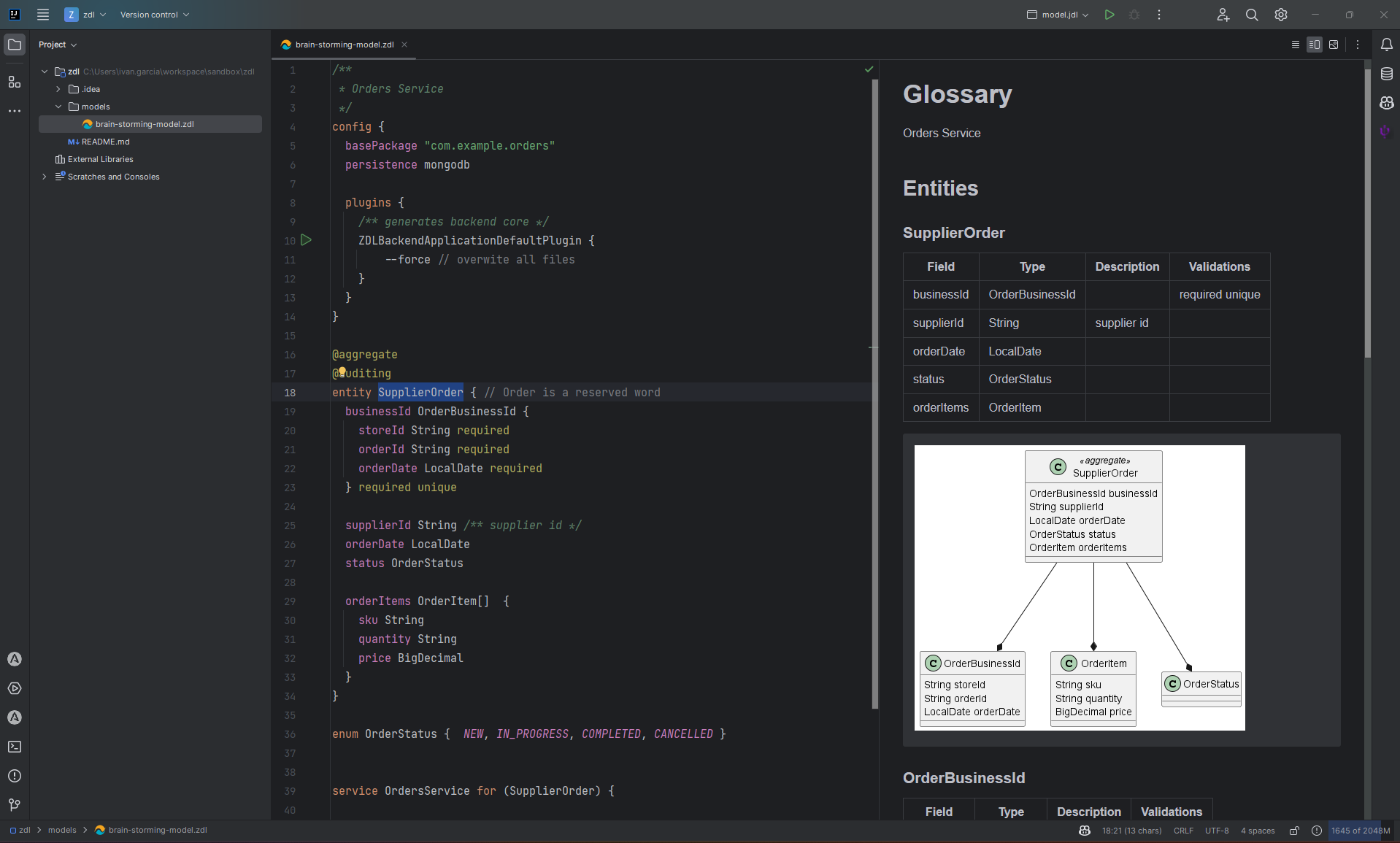
Features
Section titled “Features”ZDL Language Support
Section titled “ZDL Language Support”- Syntax highlighting for ZDL Domain Model Language
- Linting and error detection with real-time feedback
- Code completion for ZDL syntax (work in progress)
- Code navigation (Ctrl+Click) from ZDL model to source code and API definitions (work in progress)
SDK Plugin Integration
Section titled “SDK Plugin Integration”- Execute ZenWave SDK plugins directly from the editor with the Play button
- Copy generated command lines by hovering over the Play button
- Plugin configuration through ZenWave Scripts Files (
.zw) - Real-time code generation from your ZDL models
Documentation & Visualization
Section titled “Documentation & Visualization”- Markdown preview with PlantUML diagrams (requires PlantUML plugin)
- Interactive documentation generation from your domain models
ZenWave Scripts Files (.zw)
Section titled “ZenWave Scripts Files (.zw)”The plugin supports ZenWave Scripts Files that define SDK plugins and their configurations:
config {
    // Global configuration
    zdlFile "zenwave-model.zdl"

    plugins {
        /** Generates OpenAPI 3.0 from ZDL model */
        ZDLToOpenAPIPlugin {
            idType integer
            targetFile "src/main/resources/public/apis/openapi.yml"
        }

        /** Generates AsyncAPI 3.0 from ZDL model */
        ZDLToAsyncAPIPlugin {
            asyncapiVersion v3
            targetFile "src/main/resources/public/apis/asyncapi.yml"
        }

        /** Generates Backend Application (Headless Core) */
        BackendApplicationDefaultPlugin {
            useLombok true
            includeEmitEventsImplementation true
        }

        /** Generates Spring MVC controllers (Web Adapters) */
        OpenAPIControllersPlugin {
            openapiFile "src/main/resources/public/apis/openapi.yml"
        }

        /** Generates Spring WebTestClient tests */
        SpringWebTestClientPlugin {
            openapiFile "src/main/resources/public/apis/openapi.yml"
            groupBy businessFlow
            businessFlowTestName CreateUpdateDeleteCustomerIntegrationTest
            operationIds createCustomer,updateCustomer,deleteCustomer,getCustomer
        }

        /** Generates KarateDSL tests */
        OpenAPIKaratePlugin {
            openapiFile "src/main/resources/public/apis/openapi.yml"
            groupBy businessFlow
            businessFlowTestName CreateUpdateDeleteCustomerKarateTest
            operationIds createCustomer,updateCustomer,deleteCustomer,getCustomer
        }
    }
}
Configuration Precedence
Section titled “Configuration Precedence”The plugin follows a clear configuration hierarchy:
- Command line arguments (highest precedence)
- Plugin-specific properties (defined in
.zwfiles) - Global properties (defined in
.zwfiles) - Properties from referenced
.zdlfiles (lowest precedence)
Getting Started
Section titled “Getting Started”- Install the plugin from the JetBrains Marketplace
- Install ZenWave CLI for plugin execution:
jbang alias add --force --fresh --name=zw release@zenwave360/zenwave-sdk - Create a ZDL model file with
.zdlextension - Create a ZenWave Scripts file with
.zwextension - Configure your plugins in the scripts file
- Execute plugins using the Play button in the editor
Requirements
Section titled “Requirements”- ZenWave CLI installed via JBang for plugin execution
- PlantUML plugin (optional) for diagram preview in Markdown
ZenWave Editor for VSCode
Section titled “ZenWave Editor for VSCode”ZenWave Editor provides Syntax Highlighting for ZDL on VSCode.
It is available on the VSCode Marketplace.
It also works ‘on the web’, for example on the github.dev user interface reached by pressing . (the period key) when browsing a repository or Pull Request in GitHub.