
ZenWave Domain Language (ZDL)
Section titled “ZenWave Domain Language (ZDL)”A domain specific language (DSL) for modeling Event-Driven microservices.
Among all approaches to software development, Domain-Driven Design is the only one that focused on language as the key tool for a deep understanding of a given domain’s complexity. - Alberto Brandolini in Event Storming
Guide: How and Why to Use ZDL
Section titled “Guide: How and Why to Use ZDL”What is ZenWave Domain Language
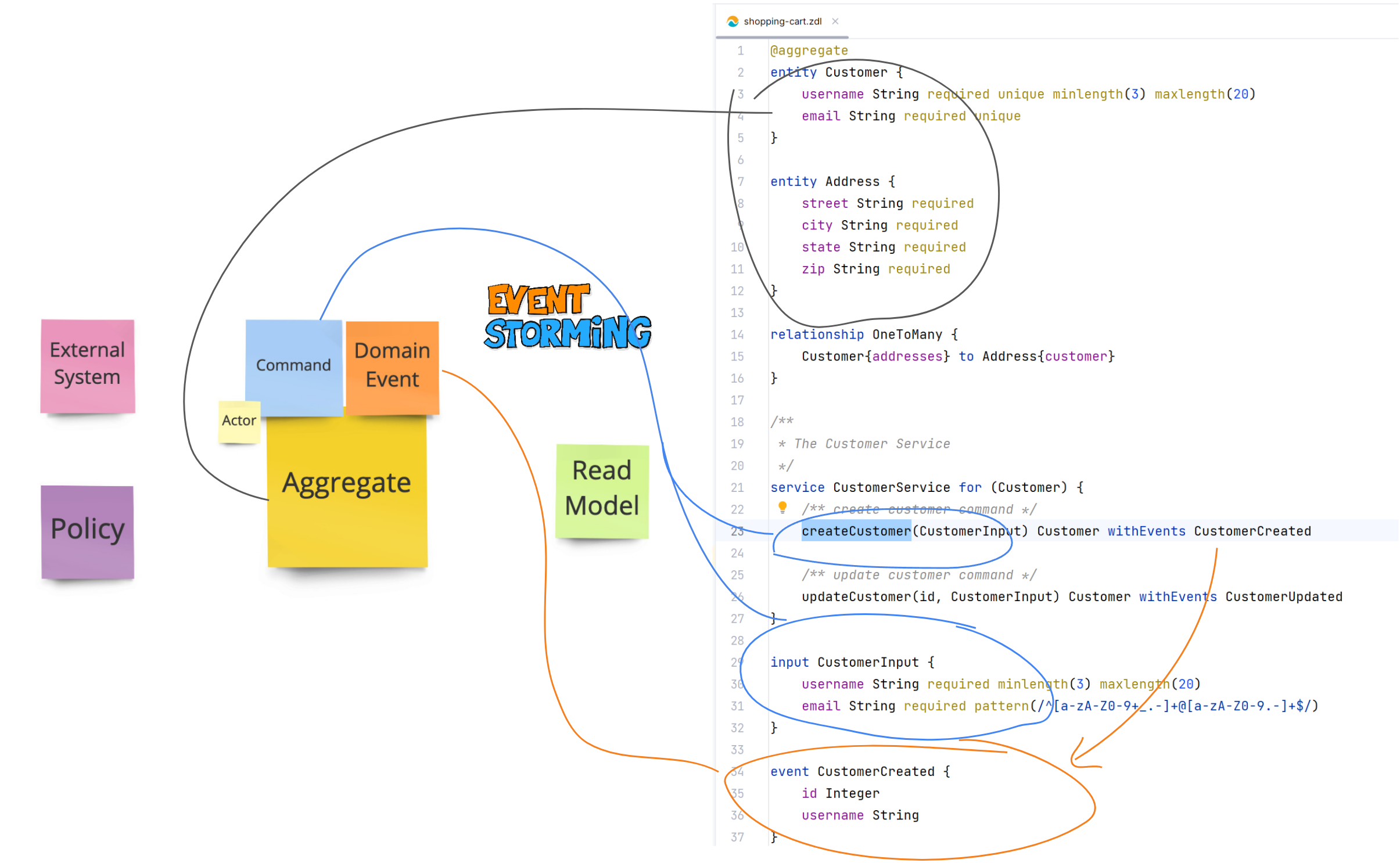
Section titled “What is ZenWave Domain Language”Inspired by JHipster JDL, ZDL is a language for describing DDD Bounded Contexts, including domain entities and their relationships, services, commands, events and business policies… for Event-Driven Architectures.
It’s designed to be compact, readable and expressive. Business friendly, developer friendly, and machine friendly.
ZDL works well as an Ubiquitous Language format.
And because it is designed to be machine-friendly, it can be converted into multiple software artifacts propagating that Ubiquitous Language automatically and effortlessly.
What Problems ZDL Solves
Section titled “What Problems ZDL Solves”- Thinking and talking about software in a compact and unambiguous way
- Validating and aligning the mental model of business experts (upstream)
- Communicating the software design clearly and consistently to developers (downstream)
- Enabling a machine-readable domain language that can be automatically transformed into consistent backend code (APIs, events, models, tests)
- Preventing Ubiquitous Language drift across APIs, events, models, documentation, and tests through DSL-driven code generation
How ZDL Fits into a Real Project
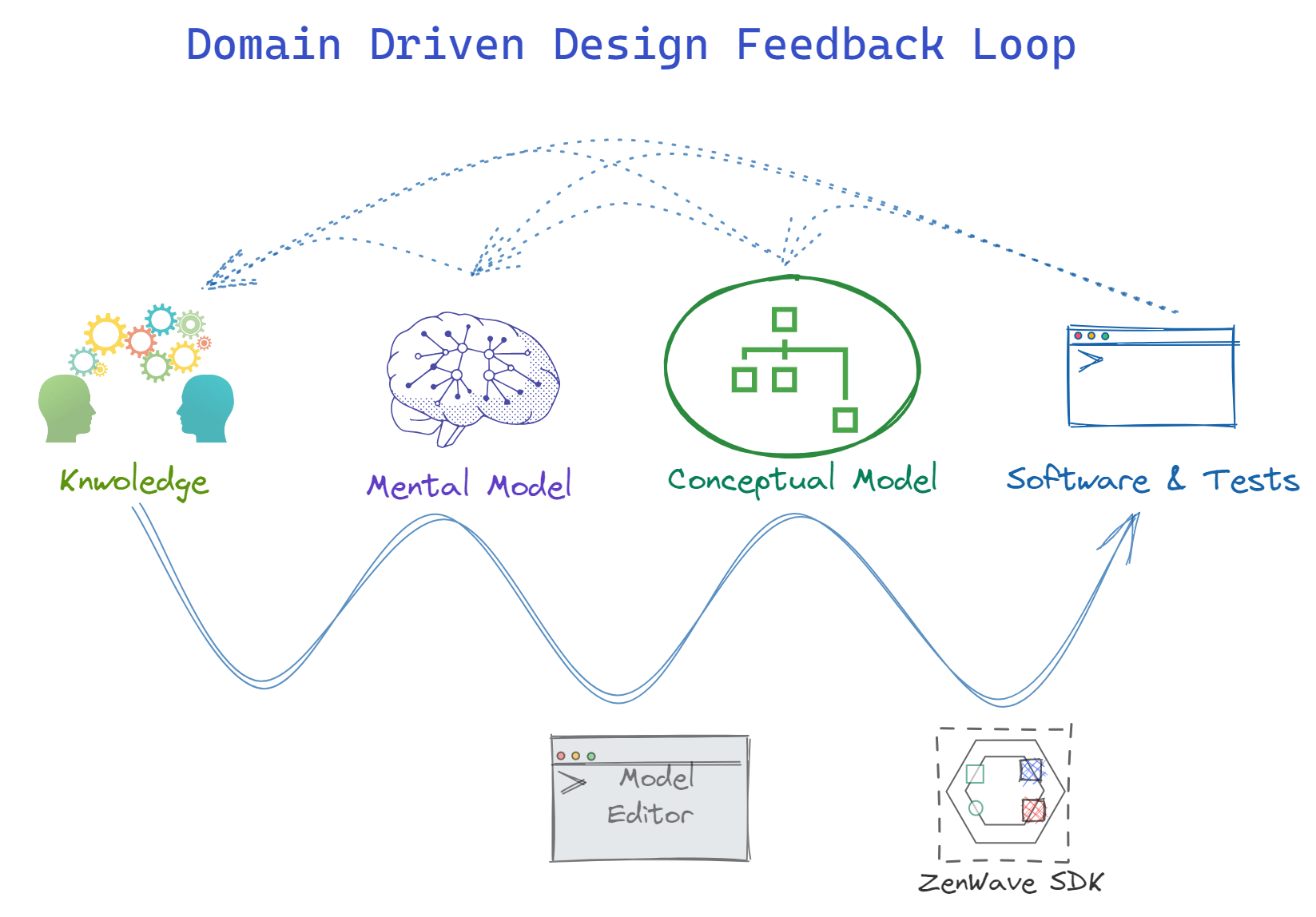
Section titled “How ZDL Fits into a Real Project”- Design Level Event Storming captures the language and mental model of business experts
- ZDL is a compact and unambiguous way to document that mental model
- ZenWave SDK can generate a growing list of software artifacts from that model
- This speeds up the feedback loop between business experts and developers while maintaining Ubiquitous Language coherence
Minimal Complete ZDL Example
Section titled “Minimal Complete ZDL Example”This example shows the smallest complete ZDL model that captures an aggregate, a command acting on it, and the domain event it emits.
@aggregate
entity Order {
  id String
  status OrderStatus
}

service OrderService for (Order) {
  placeOrder(Order) Order withEvents OrderPlaced
}

event OrderPlaced {
  id String
  dateTime Instant
}
Building a Domain Model Incrementally with ZDL
Section titled “Building a Domain Model Incrementally with ZDL”Entities
Section titled “Entities”Entities describe your domain model and form the core of your Bounded Context. They can be grouped into aggregates using either the @aggregate annotation on the aggregate root (recommended) or by defining rich domain aggregates with command handlers and domain events using aggregate objects.
/**
 * Order aggregate root
 */
@aggregate
entity Order {
    orderNumber String required unique maxlength(36)

    /** Order lines stored as JSON for simplicity in the demo */
    @json items OrderItem[] minlength(1) {
        productId String required /** Product ID (SKU) */
        quantity Integer required min(1)
        unitPrice BigDecimal required
    }
}
Services (Commands)
Section titled “Services (Commands)”Services define commands and use cases that act on aggregates.
service OrderService for (Order) {
    placeOrder(PlaceOrderInput) Order withEvents OrderPlaced

    shipOrder(id, ShipOrderInput) Order withEvents OrderShipped
}
Events
Section titled “Events”Events represent facts emitted by the domain when something happens.
@copy(Order)
@asyncapi({ channel: "OrdersPlacedChannel", topic: "orders.placed" })
event OrderPlaced {
    id Long
    // All Order fields are copied here, except relationships
}
Inputs and Outputs
Section titled “Inputs and Outputs”ZDL allows services and commands to be flexible in how they define inputs and outputs within the application core.
Operations may work directly with aggregates or entities, or use dedicated input and output types that capture only the data required for a specific use case. External communication is always handled separately through APIs, which define their own DTOs, preserving clear boundaries and stability at the edges even when using aggregates and entities as inputs and outputs.
input PlaceOrderInput {
    items OrderItem[] minlength(1)
    currency String required maxlength(3)
}

input ShipOrderInput {
    trackingNumber String required
}
Relationships
Section titled “Relationships”Relationships describe mappings between entities in relational persistence (JPA). With document-oriented databases, such as MongoDB, relationships are not necessary and nested entities are enough. From a domain perspective, this does not change the Java model itself, only its persistence mapping.
relationship OneToMany {
    Order{items required minlength(1)} to OrderItem{order required}
}
Policies
Section titled “Policies”Policies are business rules expressed in natural language. They can be associated with a particular aggregate and then referenced with the @policy(policy_code) annotation.
policies (Order) {
    orderNumberUnique "orderNumber must be unique"
}

policies {
    shipedOrdersCanNotBeCancelled "Shipped orders can not be cancelled"
}
Rich Domain Aggregates (Advanced)
Section titled “Rich Domain Aggregates (Advanced)”ZDL also supports modeling rich domain aggregates, where command handlers and domain events are defined directly on the aggregate.
This approach is more expressive but also highly opinionated. It should not be used by default, and is recommended only when the complexity of the domain clearly justifies it. In most use cases, using services is sufficient.
aggregate OrderAggregate (Order) {
    placeOrder(PlaceOrderInput) withEvents OrderPlaced
    shipOrder(ShipOrderInput) withEvents OrderShipped
}
Aggregate Lifecycle
Section titled “Aggregate Lifecycle”Aggregates can define a lifecycle block to model state machines:
entity Order { }

@lifecycle(field: status, initial = DRAFT)
aggregate OrderAggregate (Order) {
    @transition(from: DRAFT, to: PLACED)
    placeOrder(PlaceOrderInput) withEvents OrderPlaced
    @transition(from: [DRAFT, PLACED, PAID], to: CANCELLED)
    cancelOrder(CancelOrderInput) withEvents OrderCancelled
}
Lifecycle constraints:
@lifecycleannotation can be placed in the aggregate or roor entity- Single status
fieldper aggregate - States must be defined in an enum
- Commands specify allowed source states (
from) and target state (to) - Multiple source states are allowed:
from: [DRAFT, PLACED, PAID] - Commands automatically validate current state before execution
Important note: @transition annotations can also be placed on service commands, in case you are not using rich domain aggregates.
Grammar & Reference
Section titled “Grammar & Reference”The sections below describe the ZDL language in detail. They are intended as a reference for syntax and structure, not as a step-by-step guide.
File Structure
Section titled “File Structure”ZDL files follow a structured format with two main sections:
File Types and Extensions
Section titled “File Types and Extensions”ZenWave supports two file types for different purposes:
.zwfiles - Plugin configuration files that can be executed directly from IntelliJ using the play button in the gutter.zdlfiles - Domain model files that can include both model-related configuration and domain definitions
1. Prolog Section (Optional)
Section titled “1. Prolog Section (Optional)”Contains metadata and configuration used by ZenWave tooling:
global javadoc- File-level documentationconfig- Plugin configuration and generation settings (for.zwfiles) or model-related configuration (for.zdlfiles)apis- API definitions (OpenAPI, AsyncAPI references)
2. Domain Definition Section
Section titled “2. Domain Definition Section”Contains the actual domain model declarations:
entities- Domain entities and aggregatesenums- Enumeration typesaggregates- Rich domain aggregates with optional lifecycle state machinesservices- Business operations and commands, also supporting lifecycle state machinesinputs/outputs- Data transfer objectsevents- Domain eventspolicies- Business rules and policies
Structure Rules
Section titled “Structure Rules”- Files can be split into plugin configuration (
.zw) and model configuration (.zdl) - Prolog elements (
global javadoc,config,apis) must appear at the top if present - Domain elements can be declared in any order and quantity
- All prolog elements are optional
Syntax Pattern
Section titled “Syntax Pattern”[<global javadoc>]
[<config>]
[<apis>]
[<entity> | <enum> | <aggregate> | <policies> | <service> | <input> | <output> | <event>]*
The following Complete ZDL Examples demonstrate a full application with aggregates, REST API adapters, and domain event publishing:
ZenWave Scripts (.zw)
// This is a ZenWave Scripts File (.zw)//// This file defines ZenWave SDK plugins and their configurations for SDK execution and code generation.//// Usage:// - Execute plugins using the Play button in IntelliJ IDEA ZenWave Model Editor// - Or Copy the generated command line hovering the play button on each plugin// - Or Run commands directly from terminal using the generated command line//// Plugin: https://plugins.jetbrains.com/plugin/22858-zenwave-domain-model-editor-for-zdl//// There are global properties that apply to all plugins, and plugin specific properties.// Configuration Precedence (highest to lowest):// 1. Command line arguments always have the highest precedence// 2. Plugin-specific properties (defined in this file)// 3. Global properties (defined in this file)// 4. Properties from referenced .zdl files//config {
    // This is a global configuration that applies to all plugins.    zdlFile "zenwave-model.zdl"

    // these should match the values of openapi-generator-maven-plugin    // used by the OpenAPIControllersPlugin and SpringWebTestClientPlugin    openApiApiPackage "{{basePackage}}.adapters.web"    openApiModelPackage "{{basePackage}}.adapters.web.model"    openApiModelNameSuffix DTO

    plugins {        /** Generates an OpenAPI 3.0 specification from the ZDL model. */        ZDLToOpenAPIPlugin {            idType integer            idTypeFormat int64            targetFile "src/main/resources/public/apis/openapi.yml"        }        /** Generates an AsyncAPI 3.0 specification from the ZDL model. */        ZDLToAsyncAPIPlugin {            asyncapiVersion v3            idType integer            idTypeFormat int64            targetFile "src/main/resources/public/apis/asyncapi.yml"            includeCloudEventsHeaders true            includeKafkaCommonHeaders true        }        /** Generates a Backend Application from the ZDL model. (Headless Core) */        BackendApplicationDefaultPlugin {            useLombok false            useJSpecify true            includeEmitEventsImplementation true            // --force // overwite all files        }        /** Generates Spring MVC controllers from the OpenAPI specification (Web Adapters). */        OpenAPIControllersPlugin {            openapiFile "src/main/resources/public/apis/openapi.yml"        }
        SpringWebTestClientPlugin {            openapiFile "src/main/resources/public/apis/openapi.yml"        }
        SpringWebTestClientPlugin {            openapiFile "src/main/resources/public/apis/openapi.yml"            groupBy businessFlow            businessFlowTestName CreateUpdateDeleteCustomerIntegrationTest            operationIds createCustomer,updateCustomer,deleteCustomer,getCustomer        }
        OpenAPIKaratePlugin {            openapiFile "src/main/resources/public/apis/openapi.yml"        }
OpenAPIKaratePlugin { openapiFile "src/main/resources/public/apis/openapi.yml" groupBy businessFlow businessFlowTestName CreateUpdateDeleteCustomerKarateTest operationIds createCustomer,updateCustomer,deleteCustomer,getCustomer } }}ZenWave Models (.zdl)
/** * Sample ZenWave Model Definition. * * This model describes a simple Customer entity with a one-to-many relationship with PaymentMethod. * * Use zenwave-scripts.zw to generate your code from this model definition. */config {    title "ZenWave SDK - JPA BaseLine"    basePackage "io.zenwave360.example"    persistence jpa    databaseType postgresql
    // you can choose: DefaultProjectLayout, LayeredProjectLayout, SimpleDomainProjectLayout    //                 CleanHexagonalProjectLayout, HexagonalProjectLayout, CleanArchitectureProjectLayout    layout LayeredProjectLayout
    // these should match what you have configured in your pom.xml for asyncapi-generator-maven-plugin    layout.asyncApiModelPackage "{{basePackage}}.events.dtos"    layout.asyncApiProducerApiPackage "{{basePackage}}.events"    layout.asyncApiConsumerApiPackage "{{basePackage}}.commands"}
/*** Customer entity*/@aggregate@auditing // adds auditing fields to the entityentity Customer {    name String required maxlength(254) /** Customer name */    email String required maxlength(254) pattern(/^[a-zA-Z0-9._%+-]+@[a-zA-Z0-9.-]+\.[a-zA-Z]{2,4}$/)    /** Customer Addresses can be stored in a JSON column in the database. */    @json addresses Address[] minlength(1) maxlength(5) {        street String required maxlength(254)        city String required maxlength(254)    }}
@auditingentity PaymentMethod {    type PaymentMethodType required    cardNumber String required}
enum PaymentMethodType { VISA(1), MASTERCARD(2) }
relationship OneToMany {    @eager    Customer{paymentMethods required maxlength(3)} to PaymentMethod{customer required}}
// you can create 'inputs' as dtos for your service methods, or use entities directlyinput CustomerSearchCriteria {    name String    email String    city String    state String}
@rest("/customers")service CustomerService for (Customer) {    @post    createCustomer(Customer) Customer withEvents CustomerEvent    @get("/{id}")    getCustomer(id) Customer?    @put("/{id}")    updateCustomer(id, Customer) Customer? withEvents CustomerEvent    @delete("/{id}")    deleteCustomer(id) withEvents CustomerEvent    @post("/search")    @paginated    searchCustomers(CustomerSearchCriteria) Customer[]}
@copy(Customer)@asyncapi({ channel: "CustomersChannel", topic: "customers" })event CustomerEvent { id Long version Integer // all fields from Customer are copied here, but not relationships paymentMethods PaymentMethod[]}Entities and Aggregates
Section titled “Entities and Aggregates”Entities describe your domain model and form the core of your Bounded Context. They can be grouped into aggregates using either the @aggregate annotation on the aggregate root (recommended) or by defining rich domain aggregates with command handlers and domain events using aggregate objects.
Entity declaration syntax:
[<entity javadoc>]
[<entity annotation>*]
entity <entity name> [(<table name>)] {
  [<field javadoc>]
  [<field annotation>*]
  <field name> <field type> [<validation>*] [<field suffix javadoc>] [,]
}
ZDL entities are compatible with JHipster JDL entities with additional extensions:
- Annotations with values: single/double-quoted strings, numbers, booleans, and JSON objects
- Nested entities directly on fields
- Field types that can reference other entities or custom types
- Arrays as field types
Annotations
Section titled “Annotations”Annotations are decorators that add metadata to entities, similar to Java or TypeScript. They are optional and can be applied to entities, enums, fields, relationships, services, commands, and events.
Supported parameter types: keywords, strings (single/double quoted), numbers, booleans, and JSON objects.
@aggregate
@extends(BaseEntity)
entity ParkingLot {

}
SDK plugins interpret certain annotations for code generation:
@extends- Java class extension@copy- Copy fields without inheritance
Fields
Section titled “Fields”entity A {
/** the name field */
name String required unique
age Integer min(16) /** the age field */
/**
* the favorite meal field
*/
favoriteMeal String maxlength(255)
anotherField String
stringWithValue String = "initial value" required
enumTypeWithValue MyEnum = "MyEnum.VALUE1"
}Field Types and Validations
Section titled “Field Types and Validations”Supported field types:
- Primitives:
String,Integer,Long,int,long,BigDecimal,Float,float,Double,double,Boolean,boolean - Date/Time:
LocalDate,LocalDateTime,ZonedDateTime,Instant,Duration - Binary:
byte,byte[],Blob,AnyBlob,ImageBlob,TextBlob - Other:
UUID,Enum - Custom: Any other entity, enum, or custom type
Available validations:
required,uniquemin(value),max(value)minlength(value),maxlength(value)pattern(/expression/)email
Documentation Comments
Section titled “Documentation Comments”ZDL supports standard comment styles:
// line comment (ignored)/* block comment (ignored) *//** documentation comment (preserved) */
Fields support inline suffix documentation: fieldName Type /** inline docs */
Relationships
Section titled “Relationships”Relationships are mostly compatible with JDL Relationships with some differences:
- ZDL does not support
display fieldorwith builtInEntity - Options are more flexible and can be any valid annotation name/value pair
Supported relationship types: OneToOne, OneToMany, ManyToOne, and ManyToMany
Syntax:
relationship (OneToMany | ManyToOne | OneToOne | ManyToMany) {
  [<from relationship javadoc>]
  [<from relationship annotation>*]
  <from entity>[{<relationship field name> [required]}] to
  [<to relationship javadoc>]
  [<to relationship annotation>*] <to entity>[{<relationship field name> [required]}]
}
Relationships can be grouped under the same relationship keyword or declared separately:
relationship ManyToMany {
  EntityA{fieldPointingB} to EntityB{fieldPointingToA}
  EntityC{fieldPointingD required maxlength(10)} to EntityD{fieldPointingToC}
}

relationship OneToOne {
  EntityParent{fieldPointingChild} to @MapsId EntityChild{fieldPointingToParent}
}
ZenWave SDK follows DDD rules for aggregates, cascading persistence from aggregate root to dependent entities and generating unit tests to validate these cascades work as expected.
Relationships Between Aggregates
Section titled “Relationships Between Aggregates”From a DDD perspective, aggregates should be self-contained units of consistency. Relationships between aggregates should typically be modeled by reference/id rather than rich object relationships.
However, modeling relationships by id alone loses information about the relationship being modeled. ZenWave SDK supports modeling rich relationships between aggregates while still generating code that uses reference/id for the actual relationship, plus a read-only rich relationship object for accessing the related aggregate.
This option should be explicitly activated by using addRelationshipsById when using BackendApplicationDefaultPlugin.
@aggregate
entity Customer {
  name String required
}

@aggregate
entity CustomerOrder {
    orderDate ZonedDateTime required
    /* customerId Integer */ // modeling by id loses relationship information
}

relationship ManyToOne {
  // This generates both CustomerOrder.[get/set]CustomerId() methods
  // and a read-only CustomerOrder.getCustomer() method
  CustomerOrder{customer} to Customer
}
Nested Entities
Section titled “Nested Entities”When working with large object graphs, it’s often more expressive to nest entities directly on fields rather than defining them separately.
Nested entities are supported for entities, inputs, outputs, and events.
The following two mappings are equivalent:
| -> | |
NOTE: For entities, the generated code depends on the persistence technology used:
- MongoDB generates nested objects, while
- JPA generates embedded entities with all columns in the same table. Nested arrays are not supported in JPA.
Enums are compatible with JDL enums with some differences:
- Enum keys are not required to be uppercase
- Enum values can only be numbers
enum <enum name> {
  <ENUM KEY> [(<enum value>)]
}
Aggregate Objects
Section titled “Aggregate Objects”Aggregate object combines entities, command handlers and domain events for rich domain aggregates.
They look very similar to services, and for simple use cases you can use services and an entity annotated @aggregate as the aggregate root.
[<aggregate javadoc>]
[<aggregate annotation>*]
aggregate <aggregate name> (<aggregate root entity>) {

  [<command javadoc>]
  [<command annotation>*]
  <command name>([<CommandInput>]) [withEvents <DomainEvent>*]
}
ZDL Example:
aggregate DeliveryAggregate (Delivery) {

    createDelivery(DeliveryInput) withEvents DeliveryStatusUpdated

    onOrderStatusUpdated(OrderStatusUpdated) withEvents DeliveryStatusUpdated

    updateDeliveryStatus(DeliveryStatusInput) withEvents DeliveryStatusUpdated

}
Services and Commands
Section titled “Services and Commands”Services and commands are used to describe the operations, beyond CRUD, that can be performed on your domain aggregates.
Services follow this structure:
[<service javadoc>]
[<service annotation>*]
service <service name> for (<aggregate>[,<aggregate>]*)] {
  [<command javadoc>]
  [<command annotation>*]
  <command name>([<id>], [<CommandInput>]) [<CommandOutput>] [withEvents <DomainEvent>*]
}
Service Commands
Section titled “Service Commands”Service commands are transactional units of work that perform operations on aggregate entities.
They represent the functionality of your inner hexagon and should connect to the outside world through APIs, Adapters, and Mappers. Commands can be documented with annotations (like @rest or @asyncapi) that indicate which adapters will expose them. The SDK interprets these annotations for code generation, but they should not be confused with actual public APIs.
Some SDK plugins can generate draft OpenAPI and AsyncAPI definitions from these annotations, but the final API specifications (OpenAPI, AsyncAPI) should be considered the source of truth.
Service commands resemble Java methods but have important differences. They support only two parameter types:
id- Indicates the command operates on a specific aggregate entity instanceCommandInput- Points to anentityorinputtype containing the command data
Command Output:
- Can be any
entityoroutputtype, or omitted entirely - If an entity type, indicates the entity will be created or updated
- Can be marked optional with
?if the command may not return output
Events:
- Use
withEventsto specify domain events published after command execution
/**
* Service for Order Attachments.
*/
@rest("/order-attachments")
service AttachmentService for (CustomerOrder) {

  @post
  @fileupload
  uploadFile(id, AttachmentFileInput) CustomerOrder? withEvents [AttachmentFileUploaded|AttachmentFileUploadFailed]

  @get("/{orderId}")
  listAttachmentFiles(id) AttachmentFileOutput[]

  @get("/{orderId}/{attachmentFileId}")
  @filedownload("file")
  downloadAttachmentFile(AttachmentFileId) AttachmentFileOutput
}

entity CustomerOrder {}
input AttachmentFileInput {}
output AttachmentFileOutput {}
Service CRUD Commands
Section titled “Service CRUD Commands”ZDL focuses on expressing the language and structural aspects of the domain, not on specifying behavior or implementation details. Based on this model, ZenWave SDK generates a complete codebase, including production code and tests, that reflects the declared domain structure.
When processing services, the SDK attempts to infer the intended behavior from the information available in the model. For example, an operation annotated with @delete and taking an id is interpreted as deleting an entity, while a @post operation is interpreted as creating one. When no behavior can be inferred from annotations or signatures, the SDK preserves the declared structure without generating a specific implementation.
In addition, when service methods follow common CRUD naming and signature conventions, ZenWave SDK recognizes these patterns and automatically generates the corresponding CRUD implementations for those methods.
Service methods matching a CRUD pattern are treated as special by the SDK and result in generated CRUD logic:
service CustomerService for (Customer) {
    createCustomer(CustomerOrCustomerInput) Customer?
    updateCustomer(id, CustomerOrCustomerInput) Customer?
    getCustomer(id) Customer?
    listCustomers() Customer[]
    deleteCustomer(id)
}
CRUD commands may emit any domain events.
Command parameter type can be an aggregate entity or an input type. In some cases, and depending on configured settings, ZenWave SDK may generate input dtos even if entity types are used, following hexagonal/clean/onion architecture principles.
Business Policies
Section titled “Business Policies”Policies documents business decisions and rules. They can be associated with a particular aggregate and then referenced with the @policy(policy_code) annotation.
policies (Customer) {
  policy001 "Describe here the content of this business rule"
}

service CustomerService for (Customer) {
    @policy(policy001)
    createCustomer(Customer) Customer withEvents CustomerUpdated
}
Inputs
Section titled “Inputs”Inputs follow the same structure as entities, but they are not persistent. They belong to the outer ring/hexagon of your application, along with the Mappers. They are used to pass data to service commands.
They can reference other entities and enums but not they other way around. They also support nested entities.
input AttachmentFileInput {
  name String required
  file Blob required
  mimetype AttachmentFileType required
}
Outputs
Section titled “Outputs”Outputs follow the same structure as entities, but they are not persistent. They belong to the outer ring/hexagon of your application, along with the Mappers. They are used to pass data to service commands.
They can reference other entities, inputs and enums but not they other way around. They also support nested entities.
input AttachmentFileOutput {
  customerOrderId Integer required
  name String required
  file Blob required
  mimetype AttachmentFileType required
}
Domain Events
Section titled “Domain Events”Domain events are used to describe the events that are published by your domain aggregates.
[<event javadoc>]
[<event annotation>*]
event <event name> [(<channel name>)] {
  [<field javadoc>]
  [<field annotation>*]
  <field name> <field type> [<validation>*] [<field suffix javadoc>] [,]
}
Configuration Section
Section titled “Configuration Section”SDK plugin options can be configured in the config section.
This config options are inherited by all the SDK plugins, but each plugin can also define its own options.
config {
  basePackage "com.example.myapp"
  persistence mongodb
}
IMPORTANT NOTE: config and apis sections should be at the top of the file, before any other declaration and after global javadoc.
SDK Plugins
Section titled “SDK Plugins”Plugins configured in the config section can be executed directly from ZenWave Editor (IntelliJ IDEA).
In addition to their own configuration, they will inherit the following options:
zdlFilepointing to the current file,targetFolderto the project folder (not the file folder)- and all configuration from
configsection.
ZenWave Scripts (.zw)
// This is a ZenWave Scripts File (.zw)//// This file defines ZenWave SDK plugins and their configurations for SDK execution and code generation.//// Usage:// - Execute plugins using the Play button in IntelliJ IDEA ZenWave Model Editor// - Or Copy the generated command line hovering the play button on each plugin// - Or Run commands directly from terminal using the generated command line//// Plugin: https://plugins.jetbrains.com/plugin/22858-zenwave-domain-model-editor-for-zdl//// There are global properties that apply to all plugins, and plugin specific properties.// Configuration Precedence (highest to lowest):// 1. Command line arguments always have the highest precedence// 2. Plugin-specific properties (defined in this file)// 3. Global properties (defined in this file)// 4. Properties from referenced .zdl files//config {
    // This is a global configuration that applies to all plugins.    zdlFile "zenwave-model.zdl"

    // these should match the values of openapi-generator-maven-plugin    // used by the OpenAPIControllersPlugin and SpringWebTestClientPlugin    openApiApiPackage "{{basePackage}}.adapters.web"    openApiModelPackage "{{basePackage}}.adapters.web.model"    openApiModelNameSuffix DTO

    plugins {        /** Generates an OpenAPI 3.0 specification from the ZDL model. */        ZDLToOpenAPIPlugin {            idType integer            idTypeFormat int64            targetFile "src/main/resources/public/apis/openapi.yml"        }        /** Generates an AsyncAPI 3.0 specification from the ZDL model. */        ZDLToAsyncAPIPlugin {            asyncapiVersion v3            idType integer            idTypeFormat int64            targetFile "src/main/resources/public/apis/asyncapi.yml"            includeCloudEventsHeaders true            includeKafkaCommonHeaders true        }        /** Generates a Backend Application from the ZDL model. (Headless Core) */        BackendApplicationDefaultPlugin {            useLombok false            useJSpecify true            includeEmitEventsImplementation true            // --force // overwite all files        }        /** Generates Spring MVC controllers from the OpenAPI specification (Web Adapters). */        OpenAPIControllersPlugin {            openapiFile "src/main/resources/public/apis/openapi.yml"        }
        SpringWebTestClientPlugin {            openapiFile "src/main/resources/public/apis/openapi.yml"        }
        SpringWebTestClientPlugin {            openapiFile "src/main/resources/public/apis/openapi.yml"            groupBy businessFlow            businessFlowTestName CreateUpdateDeleteCustomerIntegrationTest            operationIds createCustomer,updateCustomer,deleteCustomer,getCustomer        }
        OpenAPIKaratePlugin {            openapiFile "src/main/resources/public/apis/openapi.yml"        }
OpenAPIKaratePlugin { openapiFile "src/main/resources/public/apis/openapi.yml" groupBy businessFlow businessFlowTestName CreateUpdateDeleteCustomerKarateTest operationIds createCustomer,updateCustomer,deleteCustomer,getCustomer } }}APIs Section
Section titled “APIs Section”APIs are used to document APIs exposed by your application (provider) or Third Party APIs consumed by you (client).
Use it to document the API uri along with any other field/value that you want to include. It also supports javadoc comments.
apis {
    <api type>([provider|client]) <api name> {
        uri <api uri>
        (<field> <value>)*
    }
}
Example:
apis {
    asyncapi(provider) MyEventsApi {
        uri "src/main/resources/asyncapi.yml"
    }
    openapi(provider) MyRestApi {
        uri "src/main/resources/openapi.yml"
    }
    asyncapi(client) ThirdPartyEventsApi {
        uri "https://.../asyncapi.yml"
    }
    openapi(client) ThirdPartyRestApi {
        uri "https://.../openapi.yml"
    }
}
Grammar Source
Section titled “Grammar Source”For code generators, programming agents, and tools that need the exact language syntax, the canonical grammar source is available in the ZenWave DSL repository: