
Meet ZenWave SDK Project Architecture Layouts
Project layouts let ZenWave SDK translate the same domain model into different package structures, from clean hexagonal architecture to a simple domain package, without changing the language of the model. So you can choose the project layout architecture from domain complexity rather than personal preference or hype. And it let's you 'preview' how each look and feel for your particular project before commiting to one.
Meet ZenWave SDK Project Architecture Layouts
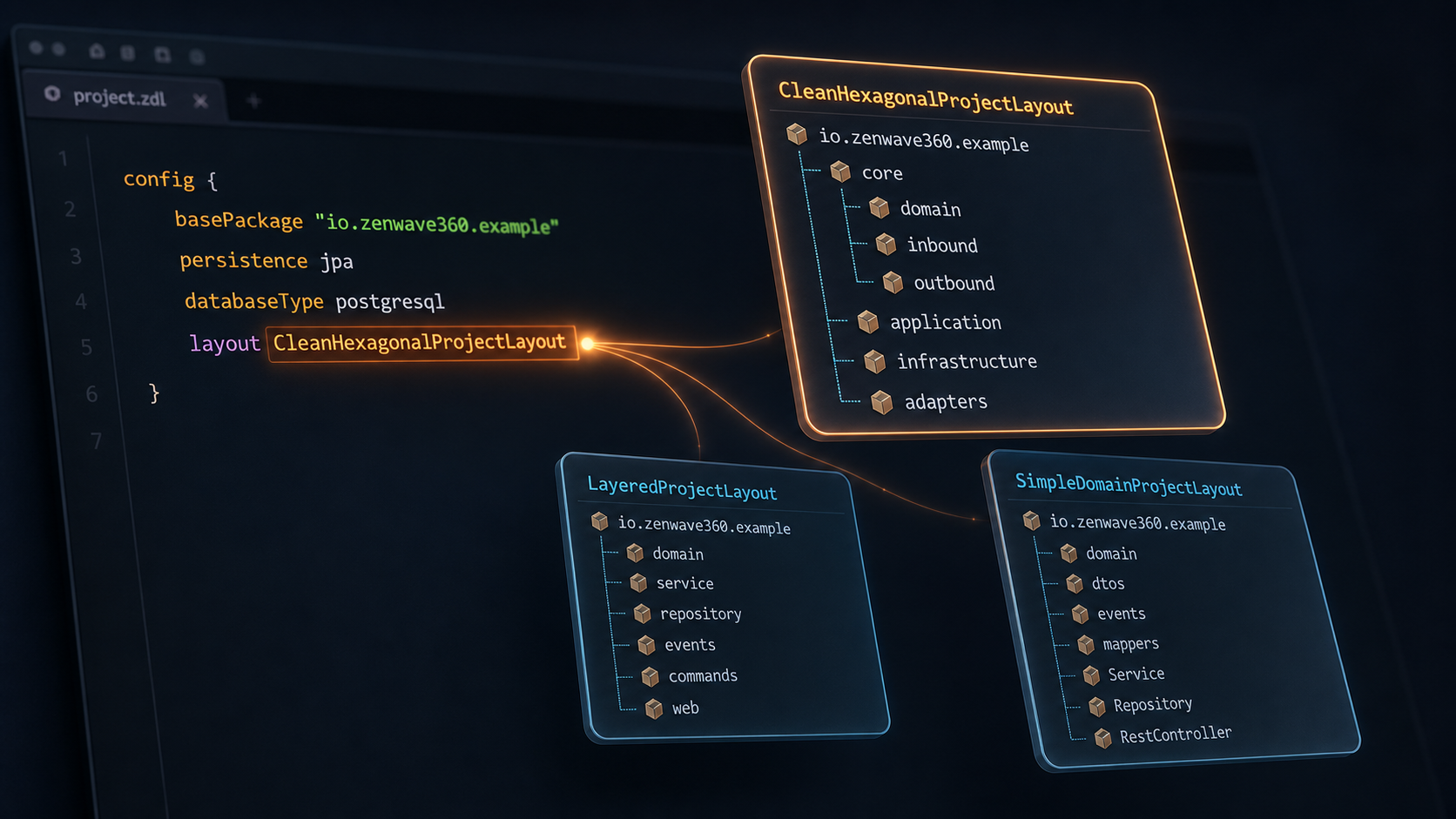
The architecture should follow the complexity of the domain, rather than personal preference or the popularity of a pattern. In a core domain, where the team is still discovering the business and the model has to absorb that knowledge as it grows, boundaries earn their cost. CleanHexagonalProjectLayout, HexagonalProjectLayout, or CleanArchitectureProjectLayout give the domain and the application a visible center, where the model can be carefully designed and protected from details that belong to web, persistence, or messaging technologies.
For a supporting or generic subdomain, or for a data centric module or microservice whose main responsibility is to store, validate, transform, and expose information, that same amount of separation may add more ceremony than value. LayeredProjectLayout gives these projects the classical web, service, and repository tiers, which are familiar, direct, and usually more than enough. Choosing it is not settling for a lesser architecture, because when business rules are thin, simplicity and ease of maintenance are part of good design.
When the module is smaller still, or is part of a bigger monolith, perhaps with one aggregate and only a few operations, SimpleDomainProjectLayout can be even more desirable. Most classes live under the same root package, with only the domain model, DTOs, events, and mappers keeping their own small spaces, so the complete service can be understood without walking through boundaries that protect no real complexity.
These layouts are not a scale of maturity, and the most elaborate one is not automatically the best. The useful question is how much structure the business problem needs, and the answer may change as the domain becomes better understood. In ZenWave SDK that decision is one word in the config block, so you can generate the same model with different layouts, compare how each one feels for the project in front of you, and choose the smallest architecture that protects the complexity that is actually there.
ZenWave SDK can generate Spring-Boot projects from the same ZDL model.
Selecting a Project Layout
The layout can be selected in the ZDL configuration with one property:
config {
    basePackage "io.zenwave360.example"
    persistence jpa
    databaseType postgresql
    layout CleanHexagonalProjectLayout

    // you can choose: DefaultProjectLayout, LayeredProjectLayout, SimpleDomainProjectLayout
    //                 CleanHexagonalProjectLayout, HexagonalProjectLayout, CleanArchitectureProjectLayout
}
That single line reorganizes how your Spring Boot project is generated.
The six layouts
CleanHexagonalProjectLayout, the default
The CleanHexagonalProjectLayout places the business application inside a core package. The domain model, service interfaces, outbound dependencies, and service implementations remain together at the center, while web and event adapters stay outside, beside the infrastructure code.
📦 io.zenwave360.example
   📦 core
      📦 domain              # entities, aggregates, value objects
         📦 events           # domain events
      📦 inbound             # service interfaces
         📦 dtos
      📦 outbound            # repository and event publisher interfaces
         📦 jpa
         📦 events
      📦 application         # service implementations
         📦 mappers
   📦 infrastructure         # custom repository implementations, event publisher
      📦 jpa
      📦 events
   📦 adapters
      📦 web                 # REST controllers
      📦 events              # event listeners
      📦 commands            # AsyncAPI command handlers
This is the structure ZenWave SDK generates by default. It gives a service clear boundaries without spreading its code across too many top level packages, which makes it a comfortable choice for a core domain or a service of moderate complexity.
DefaultProjectLayout
DefaultProjectLayout is currently another name for CleanHexagonalProjectLayout, and both generate the same structure. You can omit the layout option or select either name explicitly.
LayeredProjectLayout
LayeredProjectLayout follows the classical three tier architecture, where the web layer calls the service layer, the service layer calls the repository layer, and all three work with the same domain model.
📦 io.zenwave360.example
   📦 domain
      📦 events
   📦 service                # service interfaces
      📦 dtos
      📦 impl                # service implementations
         📦 mappers
   📦 repository
      📦 jpa
   📦 events                 # listeners and publisher
   📦 commands
   📦 web
      📦 mappers
The repository interface and its implementation share the same package because the repository is the persistence tier, not a separate outbound port. This direct structure is often the best choice for a supporting or generic subdomain, or for a data centric service where simplicity matters more than strong architectural isolation.
SimpleDomainProjectLayout
SimpleDomainProjectLayout is the smallest layout. The domain model, DTOs, events, and mappers keep their own packages, while services, repositories, controllers, and listeners live directly under the base package.
📦 io.zenwave360.example
   📦 config
   📦 domain
      📦 events
   📦 dtos
   📦 events
   📦 mappers
   ├─ *Service and *ServiceImpl
   ├─ *Repository
   ├─ *RestControllers
   └─ *EventListeners
There are no port boundaries to navigate, which is useful when a module has one small aggregate and only a few operations. In this case the flat structure is not a missing architecture, but a simpler architecture that matches the size of the problem. This is my new favorite for modular monoliths.
HexagonalProjectLayout
HexagonalProjectLayout follows Hexagonal Architecture, also known as Ports and Adapters. The domain and application packages form the interior of the hexagon. Application ports and their implementations remain grouped under application, while driving and driven adapters live as siblings under adapter.in and adapter.out.
📦 io.zenwave360.example
   📦 domain
      📦 event
   📦 application
      📦 port
         📦 in               # driving ports
            📦 dto
         📦 out              # driven ports
            📦 jpa
            📦 event
               📦 dto
      📦 service             # driving port implementations
         📦 mapper
   📦 adapter
      📦 in
         📦 web
         📦 event
         📦 command
      📦 out
         📦 jpa
         📦 event
   📦 config
Choose this layout when the team wants ports, adapters, and their direction to be explicit in the package names. A developer can read the architecture directly from the tree without translating the package vocabulary first.
CleanArchitectureProjectLayout
CleanArchitectureProjectLayout organizes packages using the ring vocabulary described by Robert C. Martin in Clean Architecture (2017). Most generated classes keep their familiar names, such as services, repositories, controllers, and listeners, but the packages place them in their architectural ring. Domain types live in domain, service interfaces and repository interfaces are placed under usecase.boundary.input and usecase.boundary.output, service implementations live under usecase.interactor, and controllers, listeners, handlers, and repository implementations live under adapter.
📦 io.zenwave360.example
   📦 domain                 # Entities ring
      📦 event
   📦 usecase                # Use Cases ring
      📦 boundary
         📦 input
            📦 dto
         📦 output
            📦 jpa
            📦 event
               📦 dto
      📦 interactor
         📦 mapper
   📦 adapter                # Interface Adapters ring
      📦 controller
         📦 dto
         📦 mapper
      📦 listener
      📦 handler
      📦 gateway
         📦 jpa
         📦 event
   📦 config
Choose it when the team already thinks in use cases, boundaries, interactors, and gateways, and wants those concepts to appear directly in the source tree.
The same model, five different projects
It is easier to see the layouts by following one class through all of them. Given basePackage of io.example and JPA persistence, here is where the generated pieces of a customers service land:
| generated artifact | CleanHexagonal | Layered | SimpleDomain | Hexagonal | CleanArchitecture |
|---|---|---|---|---|---|
| entity | core.domain | domain | domain | domain | domain |
| domain event | core.domain.events | domain.events | domain.events | domain.event | domain.event |
| service interface | core.inbound | service | base package | application.port.in | usecase.boundary.input |
| service implementation | core.application | service.impl | base package | application.service | usecase.interactor |
| repository interface | core.outbound.jpa | repository.jpa | base package | application.port.out.jpa | usecase.boundary.output.jpa |
| repository implementation | infrastructure.jpa | repository.jpa | base package | adapter.out.jpa | adapter.gateway.jpa |
| event publisher port | core.outbound.events | events | events | application.port.out.event | usecase.boundary.output.event |
| event publisher implementation | infrastructure.events | events | base package | adapter.out.event | adapter.gateway.event |
| REST controller | adapters.web | web | base package | adapter.in.web | adapter.controller |
| event listener | adapters.events | events | base package | adapter.in.event | adapter.listener |
Read the columns and you can watch a boundary appear and disappear. In the layered column the repository interface and its implementation collapse into one package, because there the repository is the persistence tier rather than a port, and in the simple column nearly everything collapses into the base package. Move to the right and the boundary comes back, until in the last two columns the port and the adapter that implements it sit in packages named after the roles they play. None of those is wrong. They are different answers to how much separation a given subdomain deserves, and the value of naming them is that the answer becomes a decision rather than an accident.
The domain model is also the persistence model
One disclaimer is necessary before calling these layouts clean or hexagonal. A purist will say that a domain model should not carry JPA or MongoDB annotations, and from a strict architectural point of view that objection is fair. ZenWave SDK makes this concession deliberately, with full awareness of the tradeoff.
-
Simplicity: We do not need a second set of persistence entities or DTOs, nor a mapper layer that keeps the domain and persistence models synchronized.
-
Stable Java API: From the application code point of view, the JPA and MongoDB variants expose the same fields, collections, getters, setters, and repository methods. Only the persistence annotations and the parent interface,
JpaRepositoryorMongoRepository, change. -
Testability: ZenWave SDK generates in memory implementations of these repository interfaces for unit tests. The complete application logic can run against them without starting a JPA persistence context, MongoDB, or a real database, which demonstrates that the code using the domain model is not coupled to the persistence annotations. Those annotations remain metadata for the persistence framework.
The result is not a perfectly technology free domain model, but a conscious compromise that removes a large amount of duplication while keeping the application code testable and dependent on repository interfaces.
Modular monoliths
A modular monolith is one service with several business modules. With ZenWave SDK, each module can be described by its own ZDL model, choose its own project layout, and generate its code into its own module package. The same zenwave-scripts.zw file can invoke BackendApplicationDefaultPlugin once for each model, so one service may contain many modules with different layouts.
Some generated Java sources are common to every module, and generating another copy inside each module would only create duplication. Project layouts therefore provide a parallel set of common package settings for domain base classes, application code, mappers, repositories, events, commands, and web adapters. By overriding these values once in the shared configuration, every module places reusable sources under the same common package while keeping its own domain code in its module package.
The Arcadia Editions modular monolith is a complete example. The relevant part of its configuration looks like this:
@import("com.arcadiaeditions.modulith.application.arcadia-editions-modulith:service-all:0.0.1")
config {

    basePackage "com.arcadiaeditions"
    layout.commonPackage "{{basePackage}}.common"
    layout.entitiesCommonPackage "{{commonPackage}}.domain"
    layout.domainEventsCommonPackage "{{commonPackage}}.domain.events"
    layout.coreImplementationCommonPackage "{{commonPackage}}"
    layout.coreImplementationMappersCommonPackage "{{commonPackage}}.mappers"
    layout.infrastructureRepositoryCommonPackage "{{commonPackage}}"
    layout.infrastructureEventsCommonPackage "{{commonPackage}}"
    layout.adaptersWebCommonPackage "{{commonPackage}}"
    layout.adaptersWebMappersCommonPackage "{{commonPackage}}.mappers"
    layout.adaptersCommandsCommonPackage "{{commonPackage}}.commands"
    layout.adaptersCommandsMappersCommonPackage "{{commonPackage}}.commands.mappers"
    layout.adaptersEventsCommonPackage "{{commonPackage}}.events"
    layout.adaptersEventsMappersCommonPackage "{{commonPackage}}.events.mappers"


    useLombok false
    useJSpecify true
    includeEmitEventsImplementation true

    useSpringModulith true // [modulith]
    transactionalOutbox modulith // [modulith]

    plugins {
        /** Generates a Backend Application from the ZDL model. (Headless Core) */
        BackendApplicationDefaultPlugin {
            zdlFile "classpath:/com/arcadiaeditions/modulith/application/arcadia-editions-modulith/catalog-inventory-domain-model.zdl"
        }
        BackendApplicationDefaultPlugin {
            zdlFile "classpath:/com/arcadiaeditions/modulith/application/arcadia-editions-modulith/catalog-products-domain-model.zdl"
        }
        BackendApplicationDefaultPlugin {
            zdlFile "classpath:/com/arcadiaeditions/modulith/application/arcadia-editions-modulith/fulfillment-shipping-domain-model.zdl"
        }
        BackendApplicationDefaultPlugin {
            zdlFile "classpath:/com/arcadiaeditions/modulith/application/arcadia-editions-modulith/notifications-consumer-domain-model.zdl"
        }
        BackendApplicationDefaultPlugin {
            zdlFile "classpath:/com/arcadiaeditions/modulith/application/arcadia-editions-modulith/orders-checkout-domain-model.zdl"
        }
        BackendApplicationDefaultPlugin {
            zdlFile "classpath:/com/arcadiaeditions/modulith/application/arcadia-editions-modulith/payments-processing-domain-model.zdl"
        }

        /** Generates Spring MVC controllers from the OpenAPI specification (Web Adapters). */
        OpenAPIControllersPlugin {
            zdlFile "classpath:/com/arcadiaeditions/modulith/application/arcadia-editions-modulith/orders-checkout-domain-model.zdl"
            openapiFile "classpath:/com/arcadiaeditions/modulith/application/arcadia-editions-modulith/orders-checkout-openapi.yml"
            openApiModelNameSuffix DTO
        }
        SpringWebTestClientPlugin {
            zdlFile "classpath:/com/arcadiaeditions/modulith/application/arcadia-editions-modulith/orders-checkout-domain-model.zdl"
            openapiFile "classpath:/com/arcadiaeditions/modulith/application/arcadia-editions-modulith/orders-checkout-openapi.yml"
            openApiModelNameSuffix DTO
        }
    }
}
The six plugin entries generate inventory, products, shipping, notifications, checkout, and payments as modules of the same service. Each ZDL model remains responsible for its module structure and layout, while the shared overrides place common Java sources under com.arcadiaeditions.common. This keeps the modules independent where their business code differs and brings them together where sharing avoids repetition.
Writing your own
In most cases you do not need to create a new layout. You can select the closest one and override only the package fields you want to change from the config section:
config {
    layout CleanHexagonalProjectLayout
    layout.entitiesPackage "{{basePackage}}.model"
    layout.inboundPackage "{{basePackage}}.api"
    layout.inboundDtosPackage "{{layout.inboundPackage}}.dto"
}
The modular monolith example above follows the same idea, using the common package fields to move shared Java sources without changing the layout of every module. This form of customization remains close to the ZDL model, where the next person can see it, and is usually the simplest place to begin.
When the complete package structure is different, you can create a Java class that extends ProjectLayout, or extend the existing layout that is closest to your architecture. From there you can define every package once and reuse the new layout across projects.
Validate the architecture with jMolecules
When you enable useJMolecules, ZenWave SDK uses the selected layout to add jMolecules annotations to the generated source code. These annotations make the roles of aggregate roots, repositories, services, ports, and adapters visible in the code.
ZenWave SDK also generates architecture tests that run with your unit tests. They validate the DDD model and, when supported by the selected layout, verify that the generated application still respects its architectural boundaries.
You can find the complete annotation mapping and the generated validation rules in ZenWave SDK meets jMolecules: a new ZDLAnnotator.